- Joined
- Jan 20, 2026
- Messages
- 1
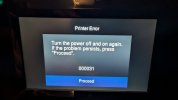
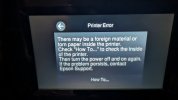
I just purchased a brand new Epson Expression Photo XP-8700 from Amazon. After removing all packaging and switching on the display correctly appears and after selecting my language another message appears about setup. After selecting continue setup without the app, the processing message appears and a circle goes round for some time. After a while it displays an error message 'Turn off the Power and then switch on again.' After switching off an on the same thing happens. At the button it says 'if the problem persists press here to proceed. After pressing this option it says there may be forein material in the printer. I have checked and there isn't any that I can see. Obvioulsy no paper as not put any in yet.
I have attached the pictures showing these errors. Surely it must be something I am doing wrong. Any ideas
I have attached the pictures showing these errors. Surely it must be something I am doing wrong. Any ideas